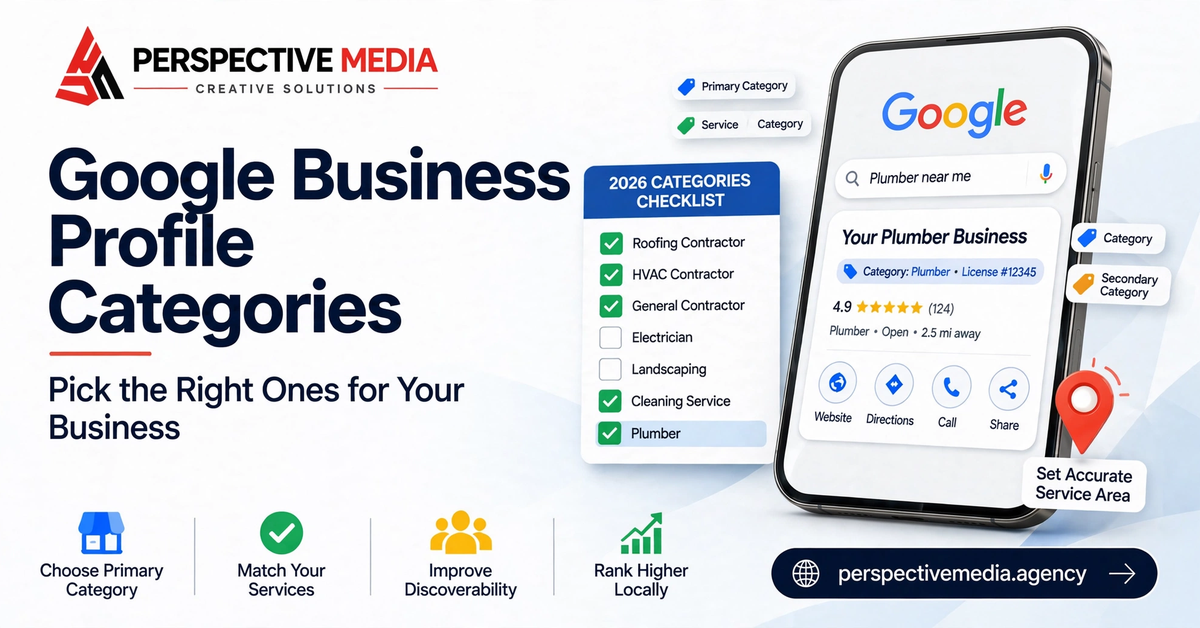
Of all the fields in your Google Business Profile, one quietly decides which searches you can compete for — and most service businesses get it wrong. Google Business Profile categories are the relevance backbone of your listing: they tell Google what your business is, which searches it should appear for, and which features (like booking buttons or service menus) your profile unlocks. Choose well and every other optimization works harder. Choose badly and you’re invisible for the exact searches that would make you money.
This guide walks through how Google Business Profile categories actually work, the difference between primary and additional categories, the mistakes that cap map-pack visibility, and a step-by-step process for picking the right ones for a service business.
How Google Business Profile Categories Affect Your Rankings
Google’s local ranking rests on three pillars: relevance, distance, and prominence. Categories are the single strongest relevance signal you directly control. When someone searches “emergency plumber,” Google doesn’t read your mind — it matches the search to businesses whose categories say “plumber,” “emergency plumbing service,” or something semantically close. Your primary category carries the most weight in that match; additional categories widen the net.
Categories also determine eligibility. Certain service categories unlock booking buttons, service menus, or eligibility for Local Services Ads. Pick a vague category like “Contractor” and you may lock yourself out of features your competitors are using. Google’s own documentation confirms that the categories you select affect your local ranking, and that more specific categories outperform general ones — so this isn’t a field to fill in casually.
There’s one more thing categories control: which searches your profile is excluded from. A business categorized as “Plumbing supply store” will struggle to rank for “plumber near me” no matter how many reviews it has, because Google reads the category as “sells plumbing parts,” not “fixes plumbing problems.” Relevance mismatches like this are one of the most common reasons a well-reviewed business can’t crack the map pack.
Primary vs Additional Google Business Profile Categories
Every profile has exactly one primary category and can have up to nine additional categories. They don’t do the same job, so treat them differently.
What your primary category does
Your primary category is your identity statement to Google — the work that generates most of your revenue. It carries the heaviest weight: for competitive searches, it’s often the deciding relevance factor between two similar profiles.
Be as specific as the category list allows. “HVAC contractor” beats “Contractor.” “Drainage service” beats “Plumber” if drain work is genuinely your main business. Check the list directly in your Business Profile dashboard rather than guessing — you can’t create your own category, and close-but-wrong costs you.
What additional categories do
Additional categories describe the other genuine services you offer. A roofing company might add “Gutter cleaning service” and “Skylight contractor.” These widen the searches your profile can appear for, though each carries less weight than the primary.
The discipline here is honesty. Only add categories for work you’d actually accept. Google’s guidelines say to use the fewest categories needed to describe your core business, and adding categories for services you don’t really offer dilutes relevance — your profile starts looking like a generalist when customers are searching for a specialist. Five to eight honest additional categories is a healthy range for most trades.
The Category Mistakes That Quietly Cap Your Map-Pack Visibility
After auditing hundreds of service-business profiles, the same category errors show up again and again. Each one is easy to fix, and each one is quietly costing visibility.
Mistake 1: Sitting in a vague primary category
“Contractor,” “Home improvement store,” “Service establishment” — these generic categories tell Google almost nothing. If a specific category exists for your trade, the vague one is always the wrong choice. A kitchen remodeler categorized as “Contractor” will lose to competitors categorized as “Kitchen remodeler” for kitchen searches, every time.
Mistake 2: Choosing the category you aspire to, not the one you are
If 70% of your revenue is drain cleaning but you dream of full bathroom remodels, your primary category should still reflect drain cleaning. Google matches categories to real search behavior, and your reviews, photos, and website all reinforce what you actually do.
Mistake 3: Stacking every category that sounds related
More is not better. Nine loosely related categories signal “jack of all trades” to Google’s relevance systems. Worse, some businesses add competitor categories (“Locksmith” on a garage-door profile) hoping to siphon searches. Google treats this as manipulation, and customers who click through and find the wrong service bounce — which hurts you twice.
Mistake 4: Ignoring category changes Google makes for you
Google sometimes edits categories itself, based on user suggestions or its own data. If your rankings suddenly drop for no apparent reason, check your categories first — it’s a two-minute check that explains a surprising number of “mystery” ranking losses.
Mistake 5: Using categories as keywords
Categories are not a keyword-stuffing field. Don’t add “Emergency plumber,” “24 hour plumber,” and “Cheap plumber” as separate categories hoping to cover every search variant. Google’s category list doesn’t work that way, and Google’s business guidelines are explicit: categories should describe what the business is, not the attributes of its services. Put service details and keywords where they belong — in your services section and business description.
How to Choose Your Google Business Profile Categories: A Step-by-Step Process
Here’s the practical process we use when setting up or auditing categories for a service business.
Step 1: List your revenue by service. Write down what you actually sell, ranked by revenue. Your primary category must match the top of that list. This takes the guesswork — and the aspiration — out of the decision.
Step 2: Search Google’s category list directly. In your Business Profile dashboard, go to Edit profile → Business category and type keywords for each service. Google shows only categories that exist; pick the most specific match for each genuine service. Google’s category management help walks through the exact clicks if you need them.
Step 3: Set the primary, then add secondaries. Choose the single category matching your main revenue line as primary. Then add additional categories for the other real services from your list — stopping when you’ve covered everything you genuinely offer, not when you hit nine.
Step 4: Check what the winners use. Search your money keywords in an incognito window and look at the categories on the map-pack profiles. If every top-ranked roofer uses “Roofing contractor” as primary and you’re on “General contractor,” you’ve found a gap.
Step 5: Audit quarterly. Google’s category list changes and your service mix changes. A five-minute check every quarter — is the primary still right, are the secondaries still honest, has anything been changed? — prevents slow relevance drift.
What Happens When You Change Categories
Changing your primary category is safe, but know what to expect. Google may ask you to re-verify your business after the edit — normal, but don’t do it the day before a seasonal push. Rankings tied to the old category can dip briefly while Google reprocesses the profile; rankings for the new, more accurate category typically improve within weeks. Don’t change categories repeatedly to “test” what ranks — frequent edits look unstable and can trigger verification loops.
FAQs About Google Business Profile Categories
How many categories can I add?
One primary plus up to nine additional categories. But the real answer is: as many as you honestly need, which for most service businesses is five to eight total. Empty slots don’t hurt you; irrelevant categories do.
Can I create my own category?
No. You can only choose from Google’s list. If the exact category you want doesn’t exist, pick the closest general category that accurately describes your business.
Do categories affect which features my profile gets?
Yes. Certain categories unlock booking buttons, service menus, and eligibility for Local Services Ads, while others don’t. Another reason to be specific — a vague category can lock you out of features built for your trade.
Why did Google change my category?
Google accepts category suggestions from users and applies its own automated edits. It’s also possible a competitor suggested an edit. Check your categories whenever rankings shift unexpectedly, and correct wrong edits promptly in your dashboard.
The Bottom Line
Google Business Profile categories are a small field with outsized power: they define your relevance, shape which searches you can win, and unlock the features your trade needs. Most service businesses set them once and never revisit them — which is exactly why getting them right is such a reliable edge.
For the full picture, our 2026 GBP optimization checklist covers categories alongside photos, reviews, posts, and everything else that moves map-pack visibility. And if you’d rather have a professional handle the whole profile, our local SEO team does this work for service businesses every day — get in touch and we’ll take a look at yours.